
Adobe Premiere Rush: The Ultimate Cross-Device Video Editor
| Developer | Adobe |
| Released on | May 20, 2019 |
| Updated | Sep 16, 2024 |
| Size | 155 mb |
| Version | 2.6.0.237 |
| Requirements | 9 |
| Downloads | 5,000,000+ |
| Get it on |  |
Description
Shoot, Edit, and Share Videos Anywhere with Adobe Premiere Rush
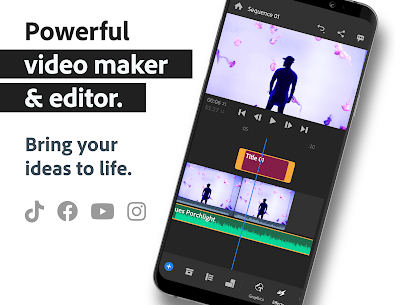
In today’s fast-paced digital world, content creators need a powerful yet easy-to-use video editing tool that enables seamless editing across devices. Adobe Premiere Rush is the ultimate all-in-one, cross-platform video editor, allowing users to shoot, edit, and share professional-quality videos effortlessly. Whether you’re a social media influencer, vlogger, or professional filmmaker, Adobe Premiere Rush offers the perfect blend of powerful tools and simplicity to create stunning videos on the go.
Why Choose Adobe Premiere Rush?
Adobe Premiere Rush stands out as one of the best video editing apps for YouTube, TikTok, Instagram, and Facebook. With intuitive drag-and-drop controls, pro-level effects, customizable templates, and cloud syncing, it provides a seamless video editing experience across Windows, Mac, Android, and iOS.
Key Features of Adobe Premiere Rush
1. Pro-Quality Video Editing on the Go
- Capture high-quality videos with the built-in professional camera.
- Edit videos instantly with a simple, user-friendly interface.
- Supports 4K video exports for high-definition content.
2. Effortless Editing with Video Effects
- Drag and drop video clips, images, audio, and graphics.
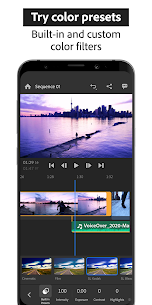
- Apply color filters, overlays, transitions, and animations.
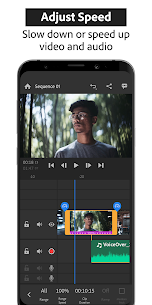
- Adjust video speed with slow-motion and fast-forward effects.
- Flip, mirror, trim, and crop videos to fit any social platform.
3. Customizable Animated Titles and Graphics
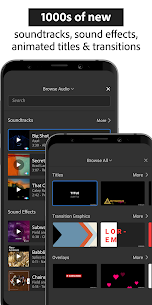
- Access built-in motion graphic templates and animated overlays.
- Modify fonts, colors, sizes, and animations to suit your branding.
- Create eye-catching intros, subtitles, and lower thirds.
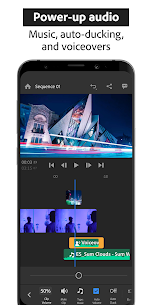
4. Add Music, Sound Effects, and Voiceovers
- Choose from thousands of royalty-free soundtracks, sound effects, and loops.
- Sync audio and video seamlessly with Adobe Sensei-powered AI tools.
- Use advanced audio tools like auto-ducking and sound balancing.
5. Multitrack Timeline for Advanced Editing
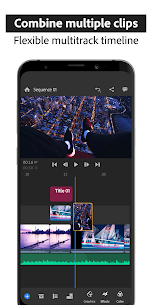
- Work with multiple video and audio layers for precise editing.
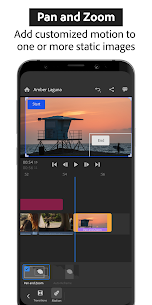
- Achieve professional effects like picture-in-picture and split-screen views.
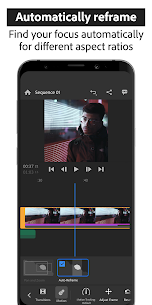
- Auto-reframe content to fit different aspect ratios (landscape, portrait, square).
6. Cloud-Based Workflow for Seamless Editing
- Edit across multiple devices with automatic cloud syncing.
- Save projects and resume editing anytime, anywhere.
- Share projects instantly to YouTube, TikTok, Instagram, and Facebook.
Adobe Premiere Rush Premium Features
For users looking for even more power, Adobe Premiere Rush Premium unlocks additional features:
Advanced Audio Tools
- Auto-ducking and AI-powered sound balancing for perfect audio levels.
- Noise reduction and advanced audio editing capabilities.
Premium Content Library
- Unlock hundreds of exclusive motion graphics, overlays, and animated templates.
- Access premium transitions, title effects, and unique video presets.
Auto-Reframe for Social Media
- Automatically detect and keep the most important part of your video in the frame.
- Effortlessly switch between landscape, portrait, and square formats.
Export in 4K and Advanced Sharing
- Export videos in ultra HD 4K resolution with top-tier quality.
- Seamlessly sync edits across mobile and desktop devices.
Who Should Use Adobe Premiere Rush?
Whether you’re a beginner or an experienced content creator, Adobe Premiere Rush is perfect for:
✅ Social Media Influencers – Create engaging content for Instagram, YouTube, and TikTok. ✅ Vloggers – Edit vlogs with cinematic effects, animated titles, and background music. ✅ Marketers & Businesses – Produce professional promotional videos and ads. ✅ Educators & Trainers – Make interactive tutorials and online courses. ✅ Travel Enthusiasts – Capture and edit on-the-go travel vlogs effortlessly.

How to Download Adobe Premiere Rush?
Adobe Premiere Rush is available for Windows, Mac, Android, and iOS. You can start using it for free with unlimited exports, or upgrade to Premiere Rush Premium for access to all features.
📥 Click the download button below
Final Thoughts: Is Adobe Premiere Rush the Right Choice?
If you’re searching for an easy-to-use yet powerful video editing tool, Adobe Premiere Rush is a fantastic option. With its cross-device functionality, professional editing tools, and seamless social media integration, it’s an ideal choice for both beginners and advanced users.
For those needing more advanced editing capabilities, consider Adobe Premiere Pro. However, if you’re looking for a quick, efficient, and intuitive video editor to create high-quality content on the go, Adobe Premiere Rush is the ultimate solution.
Best SEO Tags for Adobe Premiere Rush Blog
Adobe Premiere Rush, Adobe Premiere Rush review, Adobe Premiere Rush features, best video editing app, Adobe Premiere Rush tutorial, Adobe Premiere Rush vs Premiere Pro, Adobe Premiere Rush free, Adobe Premiere Rush for YouTube, Adobe Premiere Rush download, best Adobe Premiere Rush alternatives, mobile video editing, social media video editor, best video editing software, TikTok video editor, YouTube video editor
FAQs About Adobe Premiere Rush
1. Is Adobe Premiere Rush free? Yes! Adobe Premiere Rush offers a free version with unlimited exports. To unlock premium content, you can upgrade to Premiere Rush Premium.
2. Can I use Adobe Premiere Rush on mobile? Yes, Adobe Premiere Rush is available for Android and iOS, allowing you to edit videos directly on your phone.
3. Does Premiere Rush support 4K video editing? Yes! You can edit and export videos in 4K UHD resolution.
4. How is Adobe Premiere Rush different from Premiere Pro? Premiere Rush is a simpler, beginner-friendly version of Premiere Pro, designed for quick edits and mobile users. Premiere Pro is more advanced, offering professional-grade editing tools.
5. Can I sync my projects across devices? Yes! With Adobe Creative Cloud, your projects automatically sync across desktop and mobile devices.
With Adobe Premiere Rush, you can take your video editing to the next level—anytime, anywhere! Start creating today and enhance your storytelling with this powerful cross-device video editor. 🚀
Download links
How to install Adobe Premiere Rush: The Ultimate Cross-Device Video Editor APK?
1. Tap the downloaded Adobe Premiere Rush: The Ultimate Cross-Device Video Editor APK file.
2. Touch install.
3. Follow the steps on the screen.
How to install Adobe Premiere Rush: The Ultimate Cross-Device Video Editor XAPK?
1. Install the XAPK Installer.
1. Open XAPK and Select Adobe Premiere Rush: The Ultimate Cross-Device Video Editor XAPK file.
2. Touch install.
3. Follow the steps on the screen.
Images
Related apps


Latest Apps
-
 IGI 2 Covert Strike Download for PC – Full Version Free1 Innerloop
 -
 Project IGI Download for PC – Full Version Free1 Innerloop
 -
 Conflict: Desert Storm 2 – Tactical Warfare Reimagined in 20241
 -
 Conflict: Desert Storm 1 – Relive the Action in Desert Storm 20241
 -
 KineMaster: The Ultimate Video Editing App for Professionals & Creators7.6.5.4.34552.GP KineMaster Video Editor Experts Group
-
Most viewed apps
-
Conflict: Desert Storm 1 – Relive the Action in Desert Storm 20241
-
Conflict: Desert Storm 2 – Tactical Warfare Reimagined in 20241
-
 CapCut Video Editor – The Ultimate Free Video Editing Tool13.9.0 Bytedance Pte. Ltd.
 -
 Adobe Premiere Rush: The Ultimate Cross-Device Video Editor2.6.0.237 Adobe
 -
 Plinko For Android Download2.0 vw devop
-